
Download Peas – payment app, dry cleaner payments, easy payments, secure payments, Android app, free payment app
Overview
Peas is a free payment application designed to streamline transactions at dry cleaners, offering users a fast, secure, and convenient way to pay without incurring fees. The app is available exclusively on the Android platform and was released on July 10, 2023. Its primary purpose is to simplify the payment process for consumers by enabling digital payments directly through the app, eliminating the need for cash or card handling at the point of service.
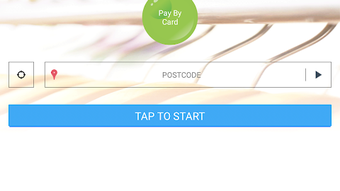
The app allows users to discover nearby dry cleaners, build a shopping basket before visiting the store, and complete payments securely using a PIN code. This workflow helps reduce wait times and improves the overall customer experience. Target users include individuals who frequently use dry cleaning services and value convenience, security, and efficiency in their daily transactions.
The app is developed by Maximum Applications, a company focused on creating accessible digital solutions for everyday tasks. Real-world usage scenarios include users preparing their laundry orders at home, selecting their preferred dry cleaner, and completing payment in advance—ensuring a seamless pickup or drop-off experience. The developer did not provide additional system requirements or details about backend infrastructure.
Key Features & Capabilities
- Discovery of Local Dry Cleaners – Users can locate nearby dry cleaning services directly within the app, enabling quick and informed decisions based on proximity and availability.
- Pre-Order Basket Building – The app allows users to compile their laundry items before arriving at the dry cleaner, saving time during in-store visits.
- Fee-Free Transactions – All payments made through Peas are processed without transaction fees, ensuring cost-effective usage for consumers.
- Secure Payment via PIN Code – Users can secure their transactions with a personal PIN code, adding an extra layer of protection to their payments.
- Card Data Protection – Peas does not store or view users’ card details; all payment processing is handled by SagePay, a recognized industry-standard provider.
- Favorites for Preferred Dry Cleaners – Users can save their most-used dry cleaners for quicker access and faster future transactions.
- Payment Tracking & Promotions – The app enables users to monitor their payment history and access exclusive discounts and savings available only to Peas users.
- Feedback & FAQ Access – Built-in support tools allow users to report issues or find answers to common questions without leaving the app.
These features collectively enhance user efficiency and trust. For example, a user can plan their laundry drop-off during their commute, pre-select their dry cleaner, and pay securely from their phone—eliminating the need to carry cash or wait in line. The integration of SagePay ensures that sensitive financial data remains protected, aligning with industry best practices for digital payments.
User Interface, Workflow & Performance
The user interface of Peas appears to be designed with simplicity and usability in mind, focusing on a clean layout that prioritizes core actions such as finding a dry cleaner, building a basket, and completing a payment. Navigation is likely structured around a central menu or bottom navigation bar, common in Android apps, allowing users to switch between discovery, basket, payment, and account sections with minimal effort. The workflow is streamlined: users begin by selecting a dry cleaner, add items to their basket, confirm the order, and authenticate the payment using a PIN code.
This logical progression supports efficient task completion. The app’s performance is expected to be responsive given its lightweight size of 10.5 MB, though exact performance details were not specified. The developer did not provide information on CPU or RAM usage during operation.
Stability is assumed to be consistent with typical Android applications of similar scope, but no user-reported issues or crash data were made available. General software behavior patterns suggest that the app functions smoothly on modern Android devices, especially those running recent OS versions. However, specific performance benchmarks or real-world load testing results were not included in the provided data.
Compatibility & System Requirements
Peas is available exclusively for Android devices. The app is compatible with Android operating systems, though the specific minimum version was not listed. It has a file size of 10.5 MB, indicating a lightweight installation that should not strain storage on most mobile devices.
The developer did not specify exact system requirements such as RAM, processor type, or minimum Android version. As a result, compatibility with older or low-end devices remains uncertain. Users are advised to ensure their device is running a supported Android version to avoid installation issues.
The app does not support other platforms, including iOS or desktop operating systems. Installation is straightforward, as it is distributed via the Google Play Store. No additional setup or configuration steps were mentioned.
The developer did not provide information about offline functionality or data synchronization behavior.
Pros and Cons
Pros
- Free to download and use with no transaction fees
- Secure payment processing through SagePay
- Allows pre-ordering and basket building for time savings
- Supports PIN code authentication for added security
- Lightweight installation at 10.5 MB
- Exclusive promotions and savings for users
- Intuitive interface focused on simplicity
- Supports favorite dry cleaners for faster access
Cons
- Available only on Android, no iOS or desktop support
- Exact system requirements not provided
- Platform-specific limitations may restrict broader accessibility
- No information on offline functionality
- Feedback mechanisms are internal; no third-party support channels
- Performance metrics were not disclosed
FAQ Section
Is Peas available for iOS devices?
Peas is currently available only on Android. There is no official version for iOS devices at this time.
How are my payment details protected?
Peas does not view or store card details. All payment processing is managed securely by SagePay, a trusted industry provider.
Can I use Peas without an internet connection?
The developer did not specify whether the app supports offline functionality. Core features like payment and basket management likely require an active internet connection.
How often does Peas receive updates?
Update frequency is not publicly disclosed. Users are encouraged to check the Google Play Store for the latest version.
Is the app truly free to use?
Yes, Peas is free to download and use. There are no transaction fees or hidden charges for using the app.
Final Thoughts + CTA
Peas offers a focused and user-friendly solution for managing dry cleaner payments on Android, combining convenience, security, and cost-effectiveness. Its ability to enable pre-ordering, secure payments via PIN, and access to exclusive savings makes it a practical tool for regular dry cleaning users. The integration with SagePay adds a layer of trust, while the lightweight design ensures minimal impact on device storage.
Although the app is limited to Android and lacks detailed system specifications, its core functionality is well-aligned with modern digital payment expectations. For individuals seeking a seamless, fee-free way to pay for dry cleaning services, Peas delivers a compelling experience. Its emphasis on privacy, ease of use, and real-time transaction tracking sets it apart in the niche of service-specific payment apps.
Download Peas now and enjoy easy, safe, and efficient payment experience.







